On-Page SEO: The Elements That Still Matter
The two numbers everyone optimises to — 60 characters and 160 — are not Google's. Its documentation says there is no limit, and says plenty that gets ignored.
Caliency
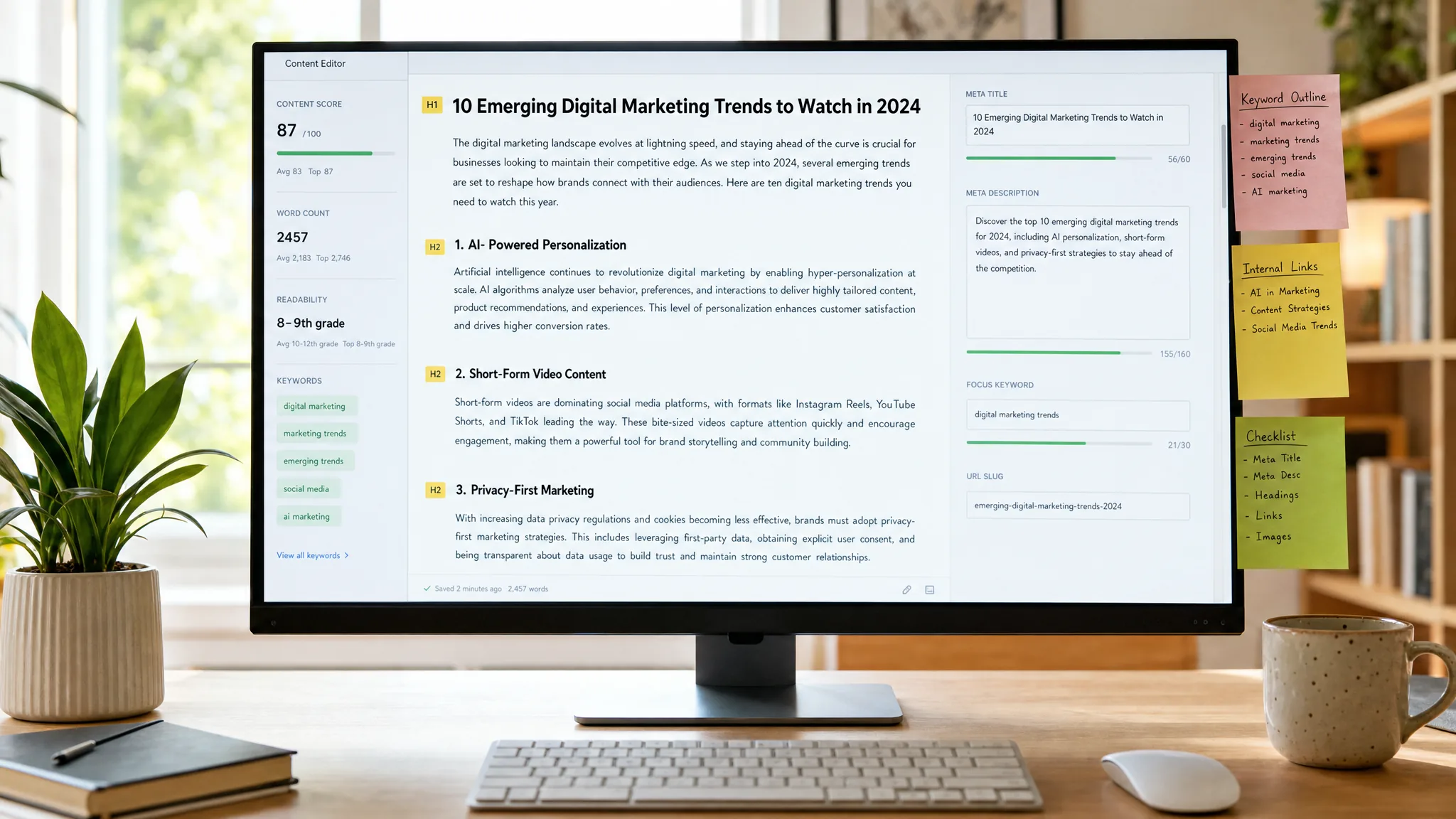
Two numbers dominate every on-page SEO checklist: 60 characters for the title, 160 for the description. Neither is Google's. Its documentation says there is no published limit for either, describes truncation by device width instead, and then says a great deal about how titles and snippets are actually produced — which is the part that gets skipped.
This guide separates the conventions from the documented behaviour, and lists what is left that genuinely changes what a searcher sees.
Google writes your title as often as you do
The title element is an input, not the output. Google's title link documentation, last updated 10 December 2025, lists what it draws on:
- the
<title>element - the "main visual title shown on the page"
- "heading elements, such as
<h1>elements" - "content in
og:titlemetatags" - "other content that's large and prominent through the use of style treatments"
- "anchor text on the page" and "text within links that point to the page"
WebSitestructured data
And it says when it will override you: "If we've detected an issue on the page, we may try to generate an improved title link from anchors, on-page text, or other sources." The issues it names include obsolete information, inaccurate descriptions, repeated boilerplate, unclear main headings, a language mismatch between title and content, and incomplete title elements.
Two practical consequences follow. First, your h1 and your title element should agree, because a disagreement is one of the conditions under which Google picks for you. Second, if your titles all end with the same forty characters of brand boilerplate, you have handed Google a reason to rewrite them.
On the 60-character rule
Google's only statement about length is this: "The title link is truncated in Google Search results as needed, typically to fit the device width."
So 60 is a convention derived from where truncation usually falls, not a specification. It is still a reasonable target — a title that gets cut mid-word reads badly in a result — but the honest framing is that you are writing to a pixel width that varies by device, not obeying a rule.
We enforce 60 in our own publishing checks, and it is worth saying that this is our choice rather than a requirement. It keeps titles disciplined and prevents the brand suffix from eating the meaningful part. It is a house style with a good reason, not a law.
The meta description is not the default snippet
This one is backwards in most guides. Google's snippet documentation, updated 20 April 2026, states:
"Snippets are primarily created from the page content itself. However, Google sometimes uses the meta description HTML element if it might give users a more accurate description of the page than content taken directly from the page."
Your description is a candidate, competing against your own page text. It is not a ranking factor, it is not guaranteed to appear, and the way to win the slot is to be a better summary of the page than the page's own opening paragraph — which is a writing problem, not a length problem.
On that length: "There's no limit on how long a meta description can be, but the snippet is truncated in Google Search results as needed, typically to fit the device width." The 155–160 convention exists for the same practical reason as the title figure.
How to choose which search a page should be built for is covered in keyword research: one page per intent.
The controls almost nobody knows about
Google documents three ways to constrain snippets, and they are worth knowing even if you never use them:
nosnippetprevents a snippet entirely.max-snippet:[number]caps its length.data-nosnippetexcludes specific parts of a page from being shown.
The third is the useful one. It lets you keep a legal disclaimer, a pricing note or a form label out of the snippet without hiding it from readers or from indexing — with the caveat that the same controls limit what AI features can use. For a page with a paywalled or sensitive section, it is the correct tool — and for a page you want clicked, all three are things to avoid by accident.
What is actually left
Strip out the folklore and the on-page list is short, boring and genuinely effective:
- A title that says what the page is, distinct from every other title on the site, with the brand suffix short enough to survive truncation.
- One h1 that agrees with the title. Not identical — agreeing.
- Content that answers the question the title asks, in the first screen rather than after eight hundred words of preamble. This is also what makes a passage quotable, which is what AI systems reward.
- Descriptive internal anchor text, because Google says it reads anchors pointing to a page when generating its title link. "Read more" contributes nothing; the name of the destination contributes twice.
- Alt text that describes the image, for readers using a screen reader first and everything else second — covered in our accessibility guide.
- Headings that describe sections, so the outline is navigable without reading the prose.
That is the whole list. Everything else on a typical on-page checklist is either downstream of these or was never documented in the first place.
Where we say no
We do not rewrite titles across a site as a first engagement. Titles are cheap to change and rarely the constraint; if pages are not indexed, or the category pages do not link to the products, the titles are not what is holding the site back. The order of operations is in our SEO audit guide.
We do not add keyword variants to titles to reach a density target. Google names keyword stuffing as one of the conditions under which it rewrites your title, so the tactic can cost you the very thing it is trying to control.
And we do not promise a meta description will appear. Nobody can, because Google says it uses page content first.
The half-hour version
- Export your titles and sort them. Duplicates and near-duplicates are the first fix, and Google names distinctness explicitly.
- Check that each h1 agrees with its title. Disagreement invites a rewrite.
- Shorten the brand suffix so the meaningful part survives truncation on a phone.
- Read five meta descriptions against the page's own opening paragraph. If the paragraph is a better summary, rewrite the description or accept that Google will use the paragraph.
- Search your site for "read more" and "click here" and replace each with the name of the destination.
If you want to know which of these your site actually needs before anyone starts rewriting, send us the domain — or see what a full engagement covers on our SEO services page.
Got a project in mind?
We'll scope it and give you a fixed price on one call.
Keep reading
Link Building in 2026: What Works, What Costs You
Most link packages describe something Google's spam policy names by example. Most toxic-link cleanups use a tool Google says most sites do not need.
→SEOE-E-A-T: What Google Actually Rewards
Google says E-E-A-T is not a ranking factor, and the raters' own manual says raters cannot rank pages. What is left is more useful than the tactic being sold.
→